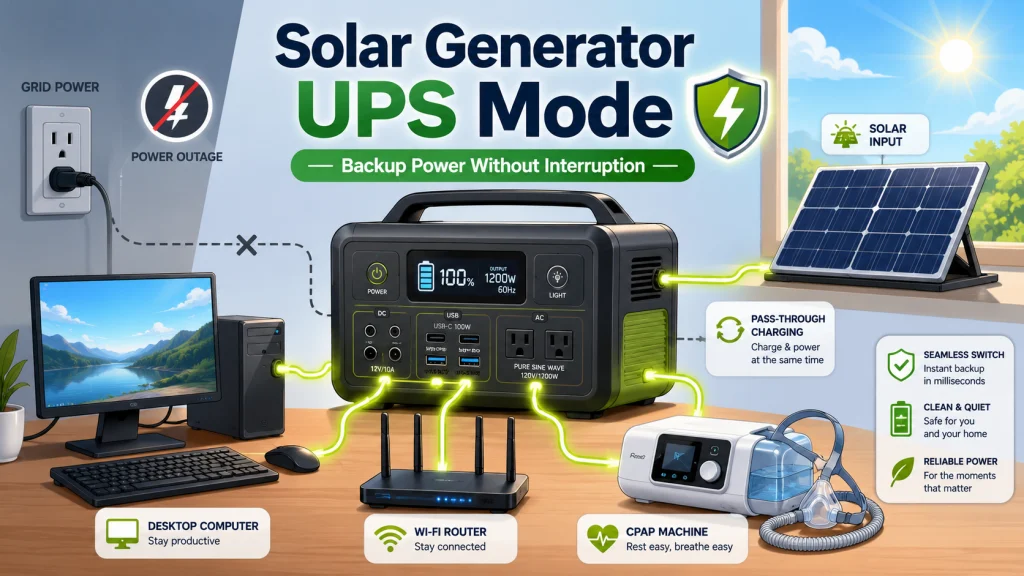
Solar Generator UPS Mode: What the Feature Actually Means
Connecting a solar generator as a UPS is not the same as plugging into the $40 battery-backup strip under a corporate desk. It is not equivalent to a rack-mounted double-conversion unit in a server room, either. What it is, specifically, is pass-through charging with a near-instant battery failover, and that distinction shapes every practical decision about how to set it up and what to plug into it.
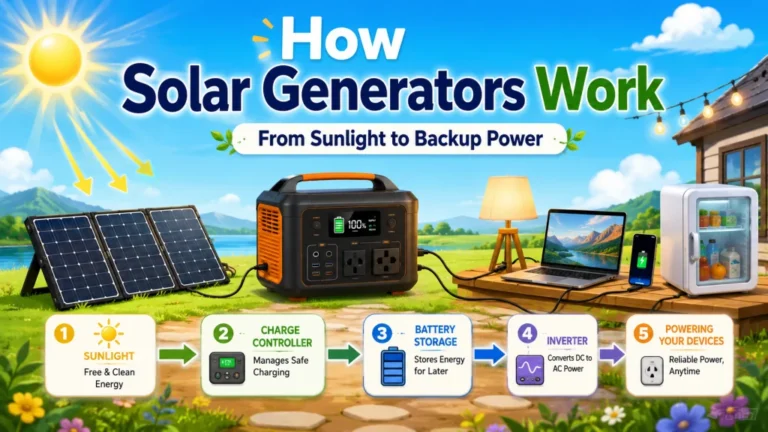
The term “uninterruptible power supply” on a solar generator spec sheet refers to how the unit manages the grid power it draws from your wall. In standard operation without UPS mode, most units charge their internal battery first and then power connected devices from that battery. The charging and output functions run in sequence. With UPS mode enabled, the unit routes incoming wall power directly to your outlets while simultaneously holding the battery at full charge. When grid power disappears, the battery takes over. At its core, the feature eliminates the gap between those two states so your connected devices never experience it.
I find it useful to think of it as two parallel paths inside one enclosure. One path handles incoming wall power and routes it to your outlets. The other monitors the battery and holds it in reserve. Under normal conditions, you are drawing from the wall, not the battery. When wall power drops, the reserve activates. The only question that matters after that is how fast the activation happens.
How Pass-Through Charging Changes the Backup Picture
Solar generator pass-through charging mode is fundamentally different from how most portable power stations behave out of the box. Without pass-through, a unit charges when plugged in and discharges when unplugged. There is always a gap between the two states. In pass-through mode, the gap disappears. The unit is simultaneously absorbing wall power and ready to discharge, at all times, without any manual switching on your part.
For a work-from-home setup, that distinction matters more than almost any other specification. Consider a 2,000Wh unit running a desktop computer at 120W, a monitor at 40W, and a router at 15W. Total draw is roughly 175W from the wall in pass-through mode. The battery stays near full the entire time. When the grid cuts mid-afternoon during a video call, the load transfers to battery power in milliseconds, the desktop never initiates a shutdown event, and the session continues on stored energy until power returns. That is a meaningfully different experience from a standard power station that requires deliberate setup as a backup device.
The separation between “charging mode” and “use mode” that defines most portable power stations is exactly what pass-through mode eliminates. For anyone planning to rely on a solar generator as a continuous backup device rather than something retrieved from the closet during an emergency, pass-through mode is the feature that makes the configuration viable. For a full overview of how to evaluate solar generators against other backup power options, the complete solar generator guide covers those tradeoffs in detail.

Starting at 2kWh and expandable to 6kWh with two additional batteries, this LFP station reaches 80% in just 43 minutes via combined AC and solar input. Its 3,000-cycle battery outlasts the industry average by 6 times and includes a 5-year service guarantee. With 2,400W output across 15 outlets and X-Boost pushing to 3,400W, it handles 99% of household appliances at a whisper-quiet 30 dB.
Check On AmazonIf you click this link and buy, we earn a commission at no additional cost to you.
Switchover Time: The Number That Decides Whether Your Devices Survive
Every device connected to a power source has a tolerance for interruption before it shuts down or resets. That tolerance, measured in milliseconds, is the specification that determines whether any given solar generator UPS mode configuration actually works. Most buyers never check this number on either end before setting up the system, which leads to surprises that show up during actual outages.
Field Note: At the shop, UPS questions almost always came from one of two people: someone who had already lost a computer during a power cut and wanted to prevent it happening again, or a CPAP user who needed reliable overnight backup without the noise and fumes of a gas setup. The question I always asked back was whether they had ever looked at their specific device’s power interruption tolerance. Almost no one had checked. Walking through that number with them saved at least a few purchases from going badly wrong.
Standard home UPS devices built for computer and server protection usually switch within 4 to 8 milliseconds. Solar generators with dedicated UPS modes are a different category entirely. High-end models that use a continuous-output inverter architecture achieve near-zero millisecond transfer because they never actually stop supplying output power. The handoff between grid and battery happens internally without any gap at the outlet. Mid-tier units with UPS mode typically fall in the 20 to 30 millisecond range. Standard models without dedicated UPS circuitry can take 100 milliseconds or more, which is enough for some hardware to register a dropout and initiate a controlled shutdown.
What each range means practically depends entirely on what you are protecting. Here is how common devices stack up against a 20ms solar generator UPS:
- Home routers and cable modems: Internal capacitors typically bridge 20 to 30ms without dropping the connection. Most solar UPS configurations handle routers without issue.
- Desktop computers: Modern ATX power supplies generally tolerate 16 to 20ms. A 20ms switchover is right at the edge for some hardware; a 30ms unit introduces meaningful risk for desktop computers specifically.
- Laptops: The internal battery acts as a continuous buffer regardless of switchover time. A solar generator in UPS mode adds a second layer of protection for a device that already has one built in.
- CPAP machines without heated humidifiers: Many tolerate brief power interruptions in the 20 to 30ms range. The core breathing function typically continues without a restart.
- CPAP machines with heated humidifiers: In many setups, the humidifier element may drop briefly during switchover, but the core therapy function generally continues. Confirm with your device documentation if you have a specific clinical requirement.
- Home network-attached storage and servers: Varies by hardware. A 20ms gap is survivable for most consumer drives, but if you are running active database writes, verify your specific equipment’s tolerance before relying on it.
- Life-critical cardiac and clinical medical devices: Some may require transfer times under 10ms or continuous online power, depending on the device documentation. A solar generator UPS mode should not be treated as primary protection for those applications.
The table below maps device types to typical power interruption tolerances and whether a mid-tier 20ms solar generator UPS is suitable for each.
| Device Type | Typical Interruption Tolerance | Solar Generator UPS at 20ms: Suitable? |
|---|---|---|
| Home router / cable modem | 20 to 100ms | Yes, in most cases |
| Desktop computer | 16 to 50ms depending on power supply | Usually yes; verify your PSU spec |
| Laptop | Not applicable (has internal battery) | Yes |
| CPAP (no humidifier) | 30ms or more | Yes |
| CPAP (with heated humidifier) | 20 to 30ms | Mostly yes; brief humidifier drop possible |
| Home NAS / media server | Varies by hardware | Verify before relying on it for active writes |
| Life-critical clinical devices | Device-specific, often stricter than consumer electronics | No, requires dedicated clinical UPS |
The switchover time for a specific unit is not always published clearly in the product listing. If it is absent from the spec sheet, contact the manufacturer and ask for the UPS mode transfer time in milliseconds before purchasing for a sensitive application. Marketing phrases like “near-instant switchover” are not specifications. A number is.
The Hybrid Advantage: Solar Input While Running in Pass-Through Mode
A solar generator in UPS mode can do something a traditional plug-in UPS cannot: accept solar panel input at the same time it is running connected devices from wall power. This hybrid operation is one of the least-understood aspects of the feature, and it meaningfully changes the backup picture during daytime hours.
The practical setup is straightforward. Solar panels connect to the unit’s solar input port. The AC charging cable connects to a wall outlet with UPS mode enabled. Critical devices plug into the unit’s output ports. During a clear afternoon with panels deployed and receiving good sun, the unit uses that solar input to offset or supplement what it draws from the wall, and the battery stays at or near full charge throughout. If the grid cuts at 2 p.m. on a sunny day, the system immediately transitions to battery power plus ongoing solar panel input supplying part or all of the device load. A 2,000Wh unit with 200W of panels running a 300W combined device load drains far more slowly while sun is available, because solar input offsets part of the load instead of replacing the battery entirely.
This is where the solar generator UPS function moves beyond what conventional home backup hardware offers. The traditional plug-in home UPS has one energy source: grid power stored in a relatively small battery. A solar generator in pass-through mode has potentially two: grid power and solar input operating in parallel. For daytime outages in a location with reliable sun, runtime can stretch well beyond what battery capacity alone would provide. For a more detailed comparison of how solar generators and portable power stations differ in real-world configuration options, the solar generator vs portable power station comparison covers what those functional differences mean for how you set the system up.

Powered by IBC bifacial cells at up to 26.7% conversion efficiency, this panel outperforms conventional PERC panels and maintains strong output in low-light conditions. Six panels together can fully charge a 2,042Wh power station in just 2.5 hours, and 10-second setup with an ergonomic handle makes deployment effortless. IP68 waterproofing and an operating range of -4 to 149 degrees Fahrenheit ensure year-round reliability across all weather conditions.
Check On AmazonIf you click this link and buy, we earn a commission at no additional cost to you.
Continuous Pass-Through and Battery Heat: The Limitation Most Buyers Find After the Fact
Running a solar generator in continuous pass-through mode is not the same as leaving a traditional UPS plugged into the wall indefinitely. It generates more heat, and sustained heat accelerates battery degradation over time. For occasional outage protection during working hours, this is rarely a meaningful concern. For 24/7 always-on pass-through use, understanding the thermal behavior of the specific unit you are considering is worth doing before you commit to that configuration.
The internal battery management system handles thermal protection up to a point. Most well-engineered units throttle incoming charge current when battery temperature rises above threshold values, which prevents damage during intensive sessions. The issue is not peak temperature, which the BMS manages, but sustained elevated temperature across continuous operating cycles. Batteries age faster under prolonged warmth than under normal periodic charge-discharge patterns. A unit running in pass-through mode in a warm room for months accumulates heat-related degradation faster than the same unit used for occasional backup power with days or weeks between charging cycles.
There is also a specific failure mode documented in buyer communities that is worth knowing before configuring any unit for UPS use. Community research confirmed at least one unit that, when placed in pass-through mode, did not maintain a stable battery charge level as the feature is supposed to work. Instead of keeping the battery near full while routing wall power to connected devices, it cycled the battery continuously between charging and discharging, generating significant heat and accumulating unnecessary charge cycles. This is not a general characteristic of solar UPS mode as a category, but it confirms that the label does not guarantee a consistent implementation across brands or models. Verifying how a specific unit implements pass-through before depending on it for sensitive equipment is the responsible step.
Warning: If your unit runs noticeably warm during extended pass-through operation, check the manufacturer’s documentation on recommended continuous UPS duration before leaving it running unattended for extended periods.
Key point: Check whether the manufacturer explicitly supports continuous 24/7 pass-through operation in their warranty terms before committing to that configuration. Some limit recommended duration to protect battery longevity, and this information is typically buried in documentation most buyers never read.

Starting at 2kWh and expandable up to 8,448Wh with compatible expansion batteries, this LiFePO4 station delivers 2,400W across 11 ports including a 30A TT-30 RV port, dual 100W USB-C, and a dedicated 48V RV charging port. It reaches 80% in just 60 minutes via AC input and fully charges in under 4 hours with 1,200W of solar. The battery is rated for 3,000 plus cycles across a 10-year lifespan.
Check On AmazonIf you click this link and buy, we earn a commission at no additional cost to you.
When a Dedicated UPS Is Still the Right Answer
Solar UPS mode covers most home office, router, CPAP, and general electronics scenarios. There are specific situations where it does not, and being honest about those limits matters more than overselling the capability.
The clearest case is clinical medical equipment with a strict transfer-time requirement or a need for continuous online power. If a device manufacturer specifies that requirement, a solar generator in UPS mode should not be treated as primary protection regardless of marketing language. A dedicated double-conversion online UPS, which runs output from its inverter continuously and never performs an actual switch at all, is the correct device for that equipment. The solar generator handles everything else in the setup without issue; it just is not the right tool for that specific application.
Home servers used for active database writes or network-attached storage with continuous write operations may also warrant a dedicated UPS on the server hardware itself, with the solar generator protecting monitors, networking gear, and peripheral devices. The split configuration, with a dedicated UPS on the machine that cannot tolerate any gap and a solar generator for everything else, is a practical setup for home lab users who have both concerns. A 20ms gap is survivable for most consumer filesystems, but confirmed tolerances vary enough that verifying your specific hardware before relying on it is worth the five minutes it takes.
For the majority of work-from-home buyers, CPAP users, and general emergency prep setups, solar UPS mode handles the load without the constraints of a traditional small-battery home UPS. The capacity is larger, the solar recharge option adds real daytime runtime, and the all-in-one form factor eliminates a separate dedicated device from the setup. The two numbers that determine whether it works for your situation, switchover time and device tolerance, are both verifiable before you buy.

This compact plug-in monitor tracks the energy consumption of any AC 115-volt appliance and displays real-time readings of volts, amps, and wattage at 0.2 to 2.0 percent accuracy. Its large LCD screen lets you calculate electricity costs by the day, week, month, or year, making it easy to spot energy-hungry devices and trim your utility bill. It is also compatible with inverters, adding flexibility for off-grid setups.
Check On AmazonIf you click this link and buy, we earn a commission at no additional cost to you.
Final Thoughts: Three Things to Confirm Before You Rely on UPS Mode
Solar generator UPS mode is a genuinely capable feature when matched to the right setup. The gap between what buyers expect from the label and what the hardware delivers comes down to three things that are easy to confirm before purchase and much harder to discover during an actual outage.
First, find the actual millisecond switchover time for the specific model you are considering. If it is not listed on the product page, ask the manufacturer directly. “Near-instant” is a marketing phrase, not a specification. Second, check whether the manufacturer explicitly supports continuous 24/7 pass-through operation in their warranty terms. Some limit recommended duration to protect battery health, and that limit matters if you plan to run a home office setup in UPS mode every workday. Third, verify your critical devices against the stated switchover time. Most home electronics handle 20ms without registering any interruption. Certain clinical devices may require stricter protection, and for those, the solar generator is not the right primary UPS regardless of what else it does well.
Used correctly, a solar generator in pass-through mode gives you outage protection backed by a full battery reserve, the option to extend runtime through solar input during daytime outages, and a capacity that exceeds what any comparably priced plug-in home UPS delivers. The feature is real. The limitations are real. Confirming both before you configure the system is what separates a setup that works when you need it from one that surprises you at the worst possible moment.

Packing 1,024Wh of capacity into a compact 17-liter, 25-pound frame, the Elite 100 V2 is 35% smaller and 30% lighter than comparable stations, with a hidden handle for easy one-handed carry. It delivers 1,800W of AC output with 2,700W surge capacity across 11 ports to run essentials at camp, in an RV, or during outages. TurboBoost AC charging fills it in just 70 minutes, and 1,000W solar input is supported for off-grid recharging. Silent operation at 30dB and instant outage switchover make it a reliable backup for routers, PCs, and sensitive equipment.
Check On AmazonIf you click this link and buy, we earn a commission at no additional cost to you.
FAQs
🔌 What does UPS mode mean on a solar generator?
UPS mode, also called pass-through charging, means the unit routes wall power directly to your connected devices while simultaneously keeping the battery at full charge. When grid power cuts, the battery takes over within milliseconds. The goal is a seamless transition that connected devices never notice.
⚡ How fast does a solar generator switch to battery during a power cut?
It depends on the unit. High-end models with advanced UPS circuitry achieve near-zero millisecond transfer. Mid-tier units typically land in the 20 to 30 millisecond range. Standard models without dedicated UPS mode may take 100ms or more. Check the manufacturer’s published spec rather than relying on marketing language before using a unit for sensitive electronics.
💻 Is 20ms switchover fast enough to protect a desktop computer?
For most modern ATX desktop power supplies, 20ms is right at the tolerance threshold. Some handle it cleanly; others are marginal. A unit rated at 30ms introduces meaningfully more risk for desktop computers. If protecting a desktop is your priority, confirm the switchover time and cross-check it against your power supply’s rated tolerance before configuring the setup.
😴 Can I use a solar generator in UPS mode for overnight CPAP backup?
In most cases, yes. Many CPAP machines without heated humidifiers tolerate 20 to 30ms interruptions, which falls within the range of many solar generators with UPS mode. Units with heated humidifiers may experience a brief humidifier drop during switchover, but core therapy typically continues. Confirm with your specific device documentation if you have a clinical requirement.
🌞 Can I use solar panels and wall pass-through at the same time?
Yes, and this is one of the genuine advantages over a traditional plug-in UPS. Most solar generators in pass-through mode accept solar panel input simultaneously with wall power. During a daytime outage with panels deployed, the unit draws from both a full battery and ongoing solar input, which can extend runtime significantly beyond what stored energy alone would provide.
🌡️ Does running in pass-through mode all the time wear out the battery faster?
Continuous pass-through generates more heat than periodic use, and sustained heat accelerates battery aging over time. For daily working-hours use it is rarely a major concern. For 24/7 always-on operation, check the manufacturer’s documentation on recommended continuous UPS duration and confirm it is supported under warranty terms before committing to that configuration.
🏥 Can a solar generator UPS protect life-critical medical equipment?
No. Life-critical cardiac and clinical devices may require stricter transfer times or continuous online power depending on the device documentation. Those devices require a dedicated double-conversion online UPS that never actually switches at all. A solar generator handles everything else in the setup well; it is simply not the right primary device for clinical-grade protection requirements.